
Assistant Help Desk

Assistants, MagicGPT

  • Apply to Magic
  • Matching With Clients
  • Start Working
  • Get Paid
  • Ask for Help
  • Grow With Magic
  • Magic Tools
  • Magic Workspace
  • Apply to Magic
  • Matching With Clients
  • Start Working
  • Get Paid
  • Ask for Help
  • Grow With Magic
  • Magic Tools
  • Magic Workspace
  • Help
  • Assistants
  • MagicGPT

Controls & Context

These features help manage how MagicGPT interprets your prompts and uses context to generate accurate and relevant responses. Understanding these controls allows you to guide the tool more effectively based on your task.


Attachments / Direct Paste

You can attach files or images to give MagicGPT more context for your prompt. Files can be added in three ways: through the + menu, by drag and drop, or by copy-pasting directly into the chat. MagicGPT supports common file formats such as PDF, CSV, DOCX, XLSX, and PPTX, as well as images. Providing attachments helps improve the accuracy and relevance of responses.

Agent / Tool Selector

This feature controls how MagicGPT selects tools for your prompt. In Agent Mode, MagicGPT automatically chooses the most appropriate tool based on your request. If you prefer more control, you can use the Tool Selector to manually choose a specific tool depending on the task you want to accomplish.

Screen Context Enablement

Screen Context allows MagicGPT to analyze your current browser tab by sharing the tab content and a screenshot. This gives the AI additional context, making it especially useful when working with dashboards, lists, or data already visible on your screen.

Reasoning Modes
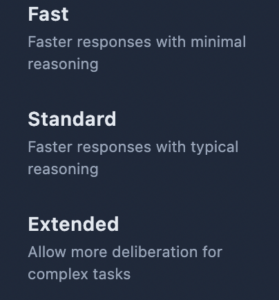
Reasoning Modes let you adjust how MagicGPT processes your request. Depending on the mode selected, the AI can perform quicker responses or more in-depth analysis before generating an output. Use this feature when you need either speed or more detailed reasoning.


Rate AI Responses

You can rate MagicGPT’s responses using the thumbs up or thumbs down buttons. Providing feedback helps improve the quality of responses over time and ensures the tool continues to meet your needs.

 

  • Still having trouble?

Get in touch with Magic Assistant Support

VIRTUAL ASSISTANTS
PRODUCT
Executive Assistants
Magic 24/7
Support
Contact
Call: (888) 404-8243
USE CASES
Executive Tasks
General + Admin Tasks
Customer Service Tasks
Bookkeeping Tasks
RESOURCES
Blog
eBooks
Case Studies
ROI Calculator
How It Works
COMPANY
About
Careers
Terms
Privacy
Contact
© 2026 Magic, Inc. All Rights Reserved.
Magic | Virtual Executive Assistants
Manage Consent
To provide the best experiences, we use technologies like cookies to store and/or access device information. Consenting to these technologies will allow us to process data such as browsing behavior or unique IDs on this site. Not consenting or withdrawing consent, may adversely affect certain features and functions.
Functional Always active
The technical storage or access is strictly necessary for the legitimate purpose of enabling the use of a specific service explicitly requested by the subscriber or user, or for the sole purpose of carrying out the transmission of a communication over an electronic communications network.
Preferences
The technical storage or access is necessary for the legitimate purpose of storing preferences that are not requested by the subscriber or user.
Statistics
The technical storage or access that is used exclusively for statistical purposes. The technical storage or access that is used exclusively for anonymous statistical purposes. Without a subpoena, voluntary compliance on the part of your Internet Service Provider, or additional records from a third party, information stored or retrieved for this purpose alone cannot usually be used to identify you.
Marketing
The technical storage or access is required to create user profiles to send advertising, or to track the user on a website or across several websites for similar marketing purposes.
  • Manage options
  • Manage services
  • Manage {vendor_count} vendors
  • Read more about these purposes
View preferences
  • {title}
  • {title}
  • {title}
Magic | Virtual Executive Assistants
Manage Consent
To provide the best experiences, we use technologies like cookies to store and/or access device information. Consenting to these technologies will allow us to process data such as browsing behavior or unique IDs on this site. Not consenting or withdrawing consent, may adversely affect certain features and functions.
Functional Always active
The technical storage or access is strictly necessary for the legitimate purpose of enabling the use of a specific service explicitly requested by the subscriber or user, or for the sole purpose of carrying out the transmission of a communication over an electronic communications network.
Preferences
The technical storage or access is necessary for the legitimate purpose of storing preferences that are not requested by the subscriber or user.
Statistics
The technical storage or access that is used exclusively for statistical purposes. The technical storage or access that is used exclusively for anonymous statistical purposes. Without a subpoena, voluntary compliance on the part of your Internet Service Provider, or additional records from a third party, information stored or retrieved for this purpose alone cannot usually be used to identify you.
Marketing
The technical storage or access is required to create user profiles to send advertising, or to track the user on a website or across several websites for similar marketing purposes.
  • Manage options
  • Manage services
  • Manage {vendor_count} vendors
  • Read more about these purposes
View preferences
  • {title}
  • {title}
  • {title}
Login as a Client
Dedicated Login
Classic Login
Login as an Assistant
Assistant Login
Don’t have an account? Get started now!