
Assistant Help Desk

Assistants, Magic Workspace

  • Apply to Magic
  • Matching With Clients
  • Start Working
  • Get Paid
  • Ask for Help
  • Grow With Magic
  • Magic Tools
  • Magic Workspace
  • Apply to Magic
  • Matching With Clients
  • Start Working
  • Get Paid
  • Ask for Help
  • Grow With Magic
  • Magic Tools
  • Magic Workspace
  • Help
  • Assistants
  • Magic Workspace

Reporting an Issue

How to report an issue to an engineer via Marker.io? You need to be logged in to your Assistant Workspace dashboard

Step 1. To log an issue or send feedback using Marker.io, click on the Marker.io widget on the right hand side of Workspace
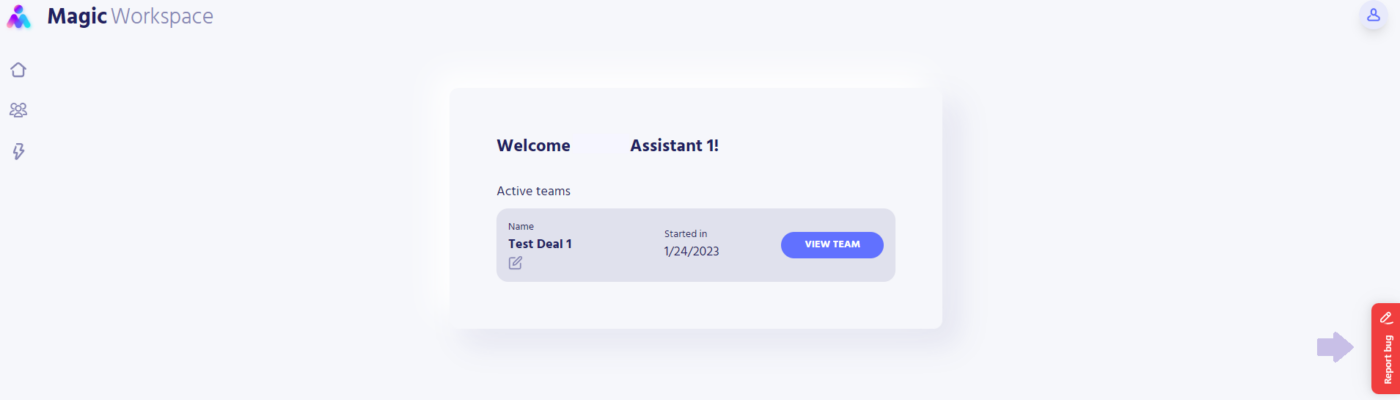
Step 2. Clicking on the widget will show a screenshot of the page you’re currently viewing and the Marker.io form.
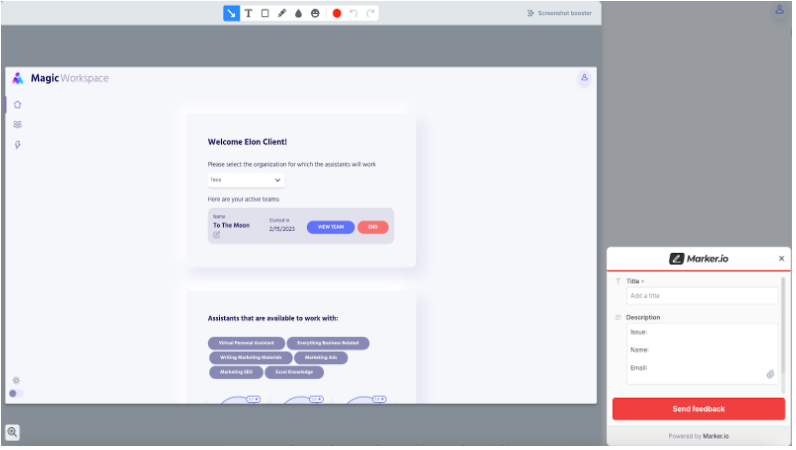
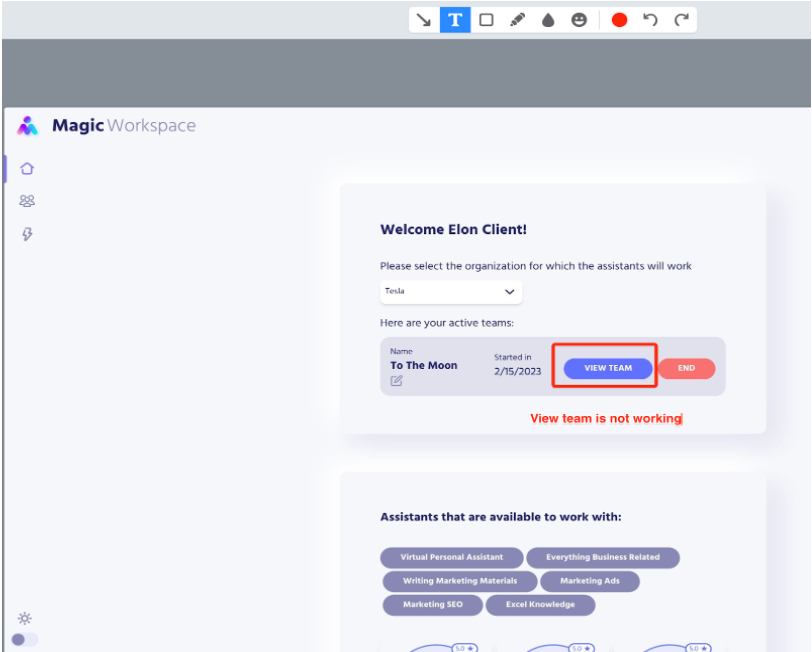
Step 3. Use the provided tools to annotate any item on the form that you are experiencing. This will help in investigating the issue.
Step 4. In the Marker.io form, add a descriptive title to your issue and provide the details (issue, name, email) using the description box.
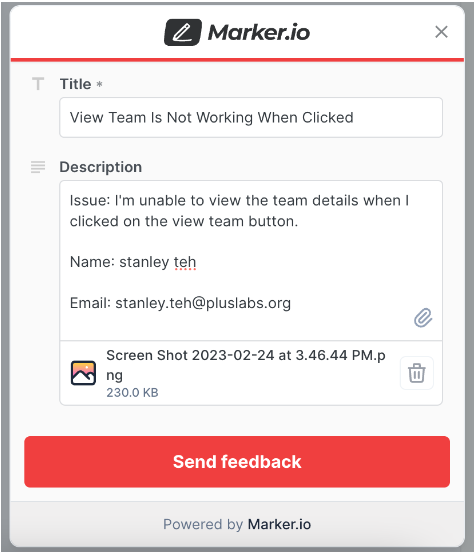
Step 5. Add additional screenshots of the issue using the paperclip icon.

Step 6. Marker.io automatically records up to the last 30 seconds of your activity before the Marker.io widget button is clicked. It also automatically adds the (1) console log, (2) browser information, and (2) computer specs.

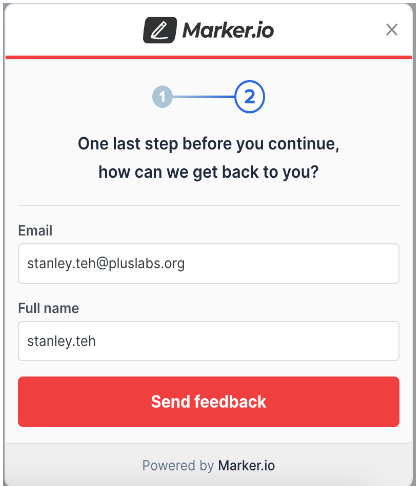
Step 7. To submit, click on the Send Feedback button, and provide your email address and full name on the succeeding dialog.
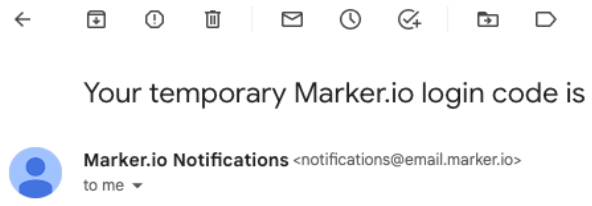
Step 8. You should receive a temporary code in the email that you provided, if it is the first time that you will be submitting an issue.
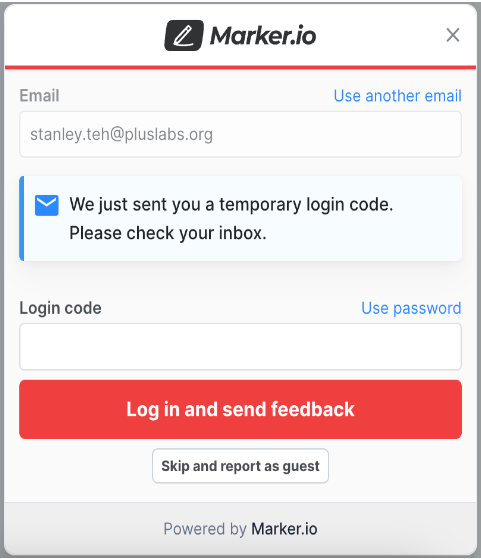
Step 9. Provide the login code on the form so it will automatically use your name and email the next time you submit an issue. We highly suggest that you provide your info and NOT use the “Skip and report as a guest” button to allow easier communication and follow-ups.
Step 10. A prompt with the message “Issue has been created” will be displayed once the form is submitted successfully.

  • Still having trouble?

Get in touch with Magic Assistant Support

VIRTUAL ASSISTANTS
PRODUCT
Executive Assistants
Magic 24/7
Support
Contact
Call: (888) 404-8243
USE CASES
Executive Tasks
General + Admin Tasks
Customer Service Tasks
Bookkeeping Tasks
RESOURCES
Blog
eBooks
Case Studies
ROI Calculator
How It Works
COMPANY
About
Careers
Terms
Privacy
Contact
© 2026 Magic, Inc. All Rights Reserved.
Magic | Virtual Executive Assistants
Manage Consent
To provide the best experiences, we use technologies like cookies to store and/or access device information. Consenting to these technologies will allow us to process data such as browsing behavior or unique IDs on this site. Not consenting or withdrawing consent, may adversely affect certain features and functions.
Functional Always active
The technical storage or access is strictly necessary for the legitimate purpose of enabling the use of a specific service explicitly requested by the subscriber or user, or for the sole purpose of carrying out the transmission of a communication over an electronic communications network.
Preferences
The technical storage or access is necessary for the legitimate purpose of storing preferences that are not requested by the subscriber or user.
Statistics
The technical storage or access that is used exclusively for statistical purposes. The technical storage or access that is used exclusively for anonymous statistical purposes. Without a subpoena, voluntary compliance on the part of your Internet Service Provider, or additional records from a third party, information stored or retrieved for this purpose alone cannot usually be used to identify you.
Marketing
The technical storage or access is required to create user profiles to send advertising, or to track the user on a website or across several websites for similar marketing purposes.
  • Manage options
  • Manage services
  • Manage {vendor_count} vendors
  • Read more about these purposes
View preferences
  • {title}
  • {title}
  • {title}
Magic | Virtual Executive Assistants
Manage Consent
To provide the best experiences, we use technologies like cookies to store and/or access device information. Consenting to these technologies will allow us to process data such as browsing behavior or unique IDs on this site. Not consenting or withdrawing consent, may adversely affect certain features and functions.
Functional Always active
The technical storage or access is strictly necessary for the legitimate purpose of enabling the use of a specific service explicitly requested by the subscriber or user, or for the sole purpose of carrying out the transmission of a communication over an electronic communications network.
Preferences
The technical storage or access is necessary for the legitimate purpose of storing preferences that are not requested by the subscriber or user.
Statistics
The technical storage or access that is used exclusively for statistical purposes. The technical storage or access that is used exclusively for anonymous statistical purposes. Without a subpoena, voluntary compliance on the part of your Internet Service Provider, or additional records from a third party, information stored or retrieved for this purpose alone cannot usually be used to identify you.
Marketing
The technical storage or access is required to create user profiles to send advertising, or to track the user on a website or across several websites for similar marketing purposes.
  • Manage options
  • Manage services
  • Manage {vendor_count} vendors
  • Read more about these purposes
View preferences
  • {title}
  • {title}
  • {title}
Login as a Client
Dedicated Login
Classic Login
Login as an Assistant
Assistant Login
Don’t have an account? Get started now!